🚀 GuestPress is live on Product Hunt today — upvotes mean the world!


Available free on WordPress.org
WordPress Hotel Booking PluginGuestPress turns your WordPress site into a direct booking engine. Guests book and pay through your own WooCommerce store — zero OTA commission, zero platform fees, no middlemen.
Sound familiar?
On a $150 room night, that's up to $37 per stay going to a platform you don't control. Direct bookings put that money back in your pocket — every single time.
The most popular hotel booking plugins on WordPress.org average 3.7 stars — with complaints about broken features, no developer support, and compatibility issues. Your guests deserve better.
Juggling an external booking platform plus your own WordPress site creates two brands, two systems, and twice the confusion. One site. One checkout. One experience.
What's included
Guests pick check-in and check-out dates, see live pricing, and add to cart in seconds — all without leaving your site.
Bookings flow straight into WooCommerce. Accept payment via any gateway you already use — Stripe, PayPal, Square, or cash on delivery.
Confirmed orders instantly block those dates. Cancellations release them automatically. No manual calendar juggling required.
List every room in your property — singles, suites, villas — each with photos, description, capacity, and per-night rate.
Mark any room as unavailable — it disappears from the booking widget and room listings without being deleted. Ideal for renovations or seasonal closures. Different from calendar date blocking.
Check-in date, check-out date, room name, and total nights are automatically added to WooCommerce order confirmation emails.
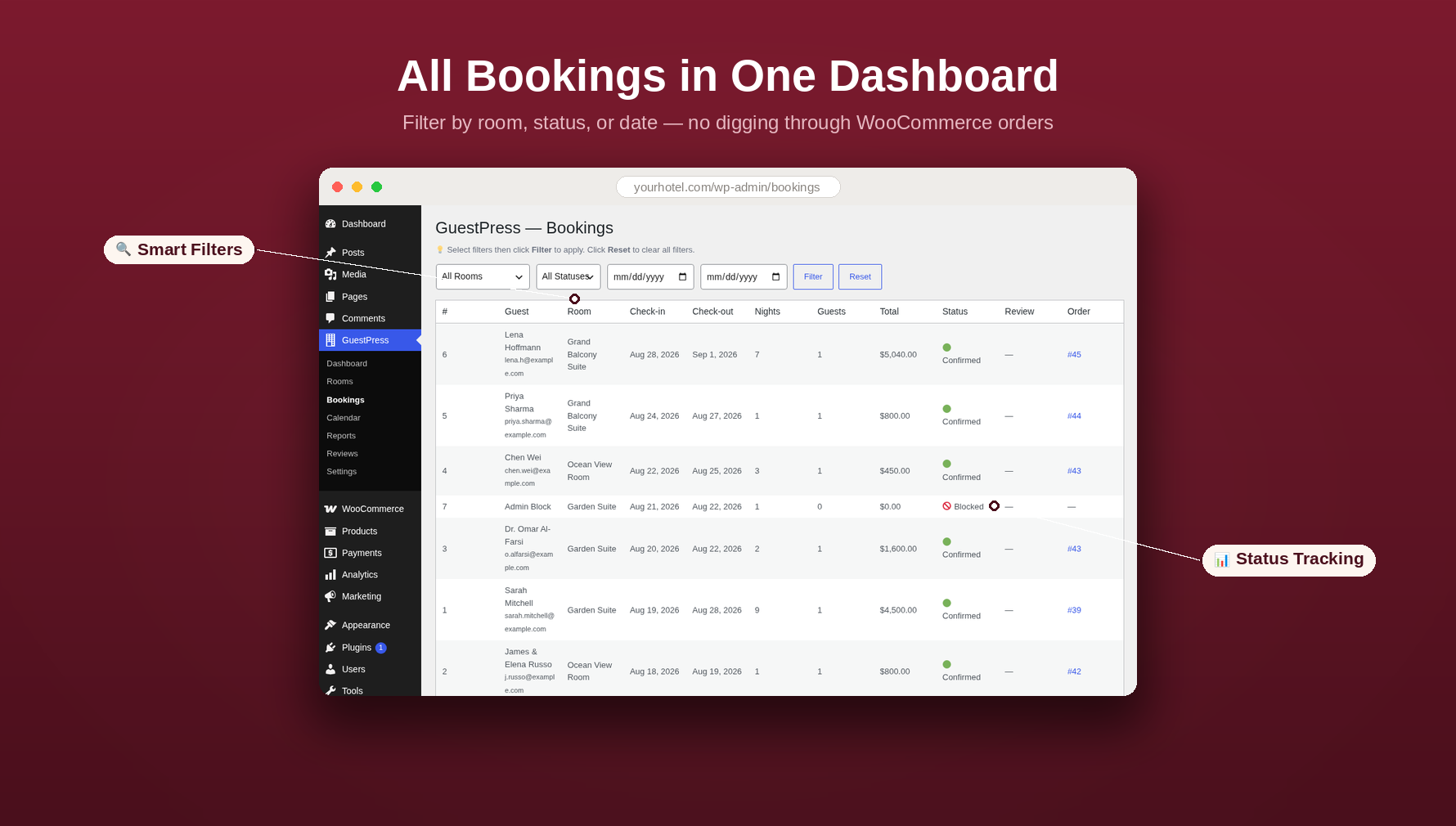
See all upcoming reservations at a glance. Filter by status, date range, and room — no digging through WooCommerce orders.
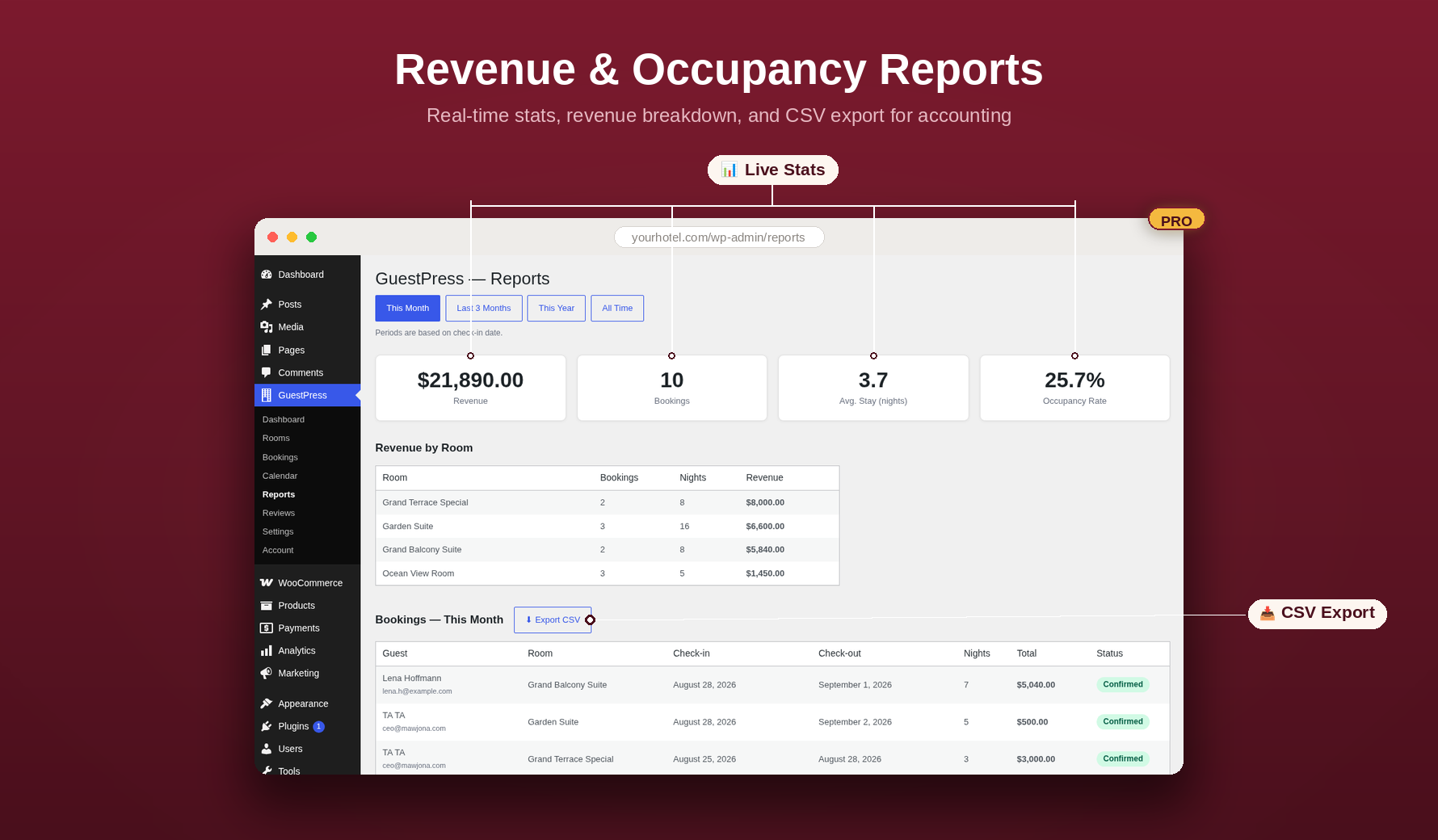
Real-time stat cards — revenue, bookings, occupancy rate, and average stay length — update as reservations come in. Plus a full CSV download ready for operations and accounting.
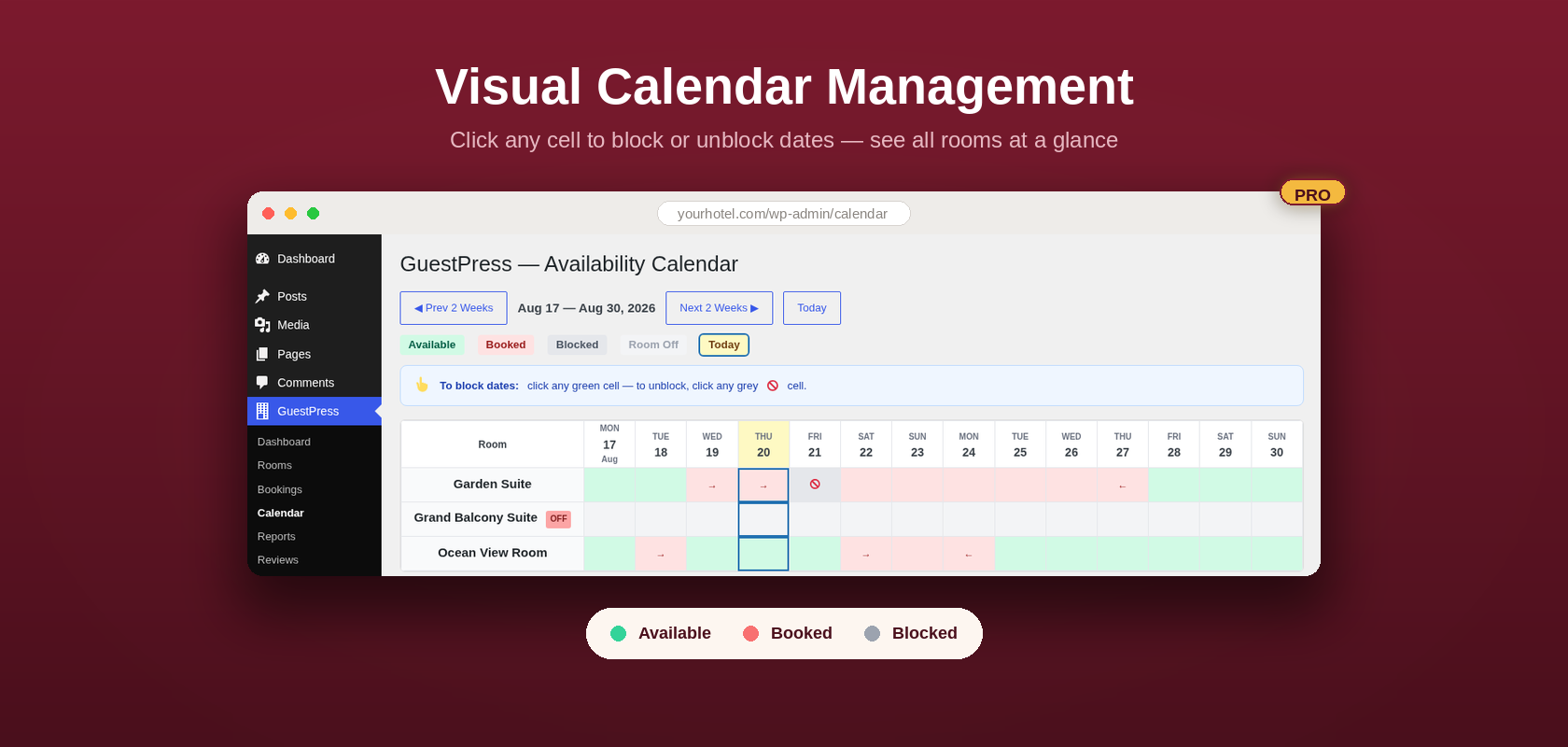
Block any date range across any room for maintenance, owner stays, or seasonal closure. Click a cell to block it, click again to release it.
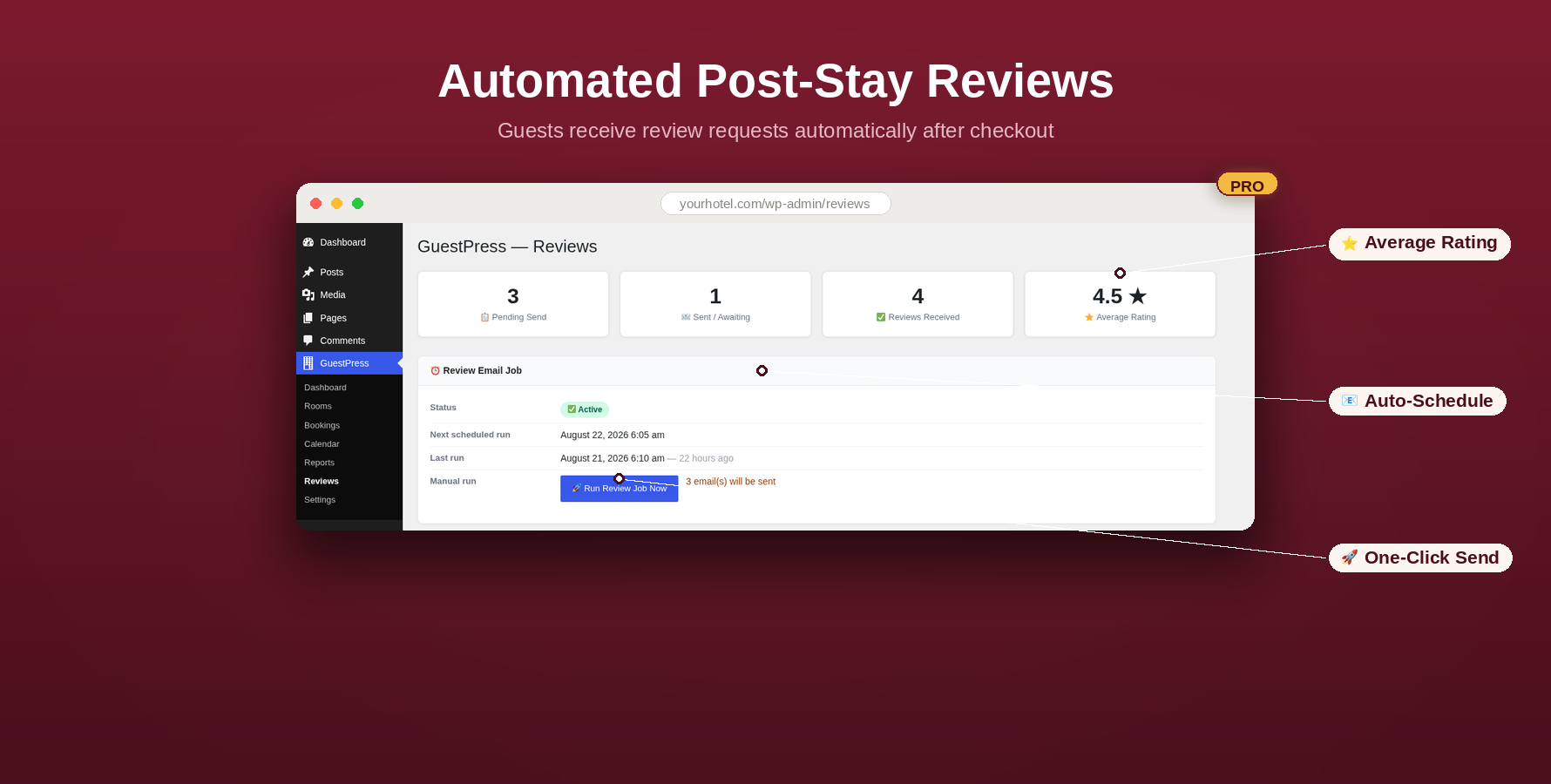
Automatically request a review from guests after checkout. Track every request — sent, pending, and completed — and manage all reviews from your dashboard.
Reward longer stays with automatic discounts. Set rules like "10% off for 7+ nights" and GuestPress applies them at checkout.
See it in action
Real screenshots from the plugin — no mockups, no stock photos.
The GuestPress booking widget drops into any room page. Guests pick their dates, see live pricing, and check out through WooCommerce — all without leaving your website.
The bookings dashboard shows all upcoming and past reservations in one place. Filter by room, date range, or status — no digging through WooCommerce orders.
 🔍 Click to enlarge
Know exactly how your property is performing. Real-time stat cards for total revenue, bookings, occupancy rate, and average stay length — with a CSV export ready for your accountant.
 🔍 Click to enlarge
Block any date across any room in seconds. Click a cell to block it for maintenance, owner stays, or seasonal closure. Click again to release it. No form. No fuss.
 🔍 Click to enlarge
GuestPress emails guests automatically after checkout and asks for a review. Track every request from sent to submitted — all managed from your WordPress dashboard.
 🔍 Click to enlarge
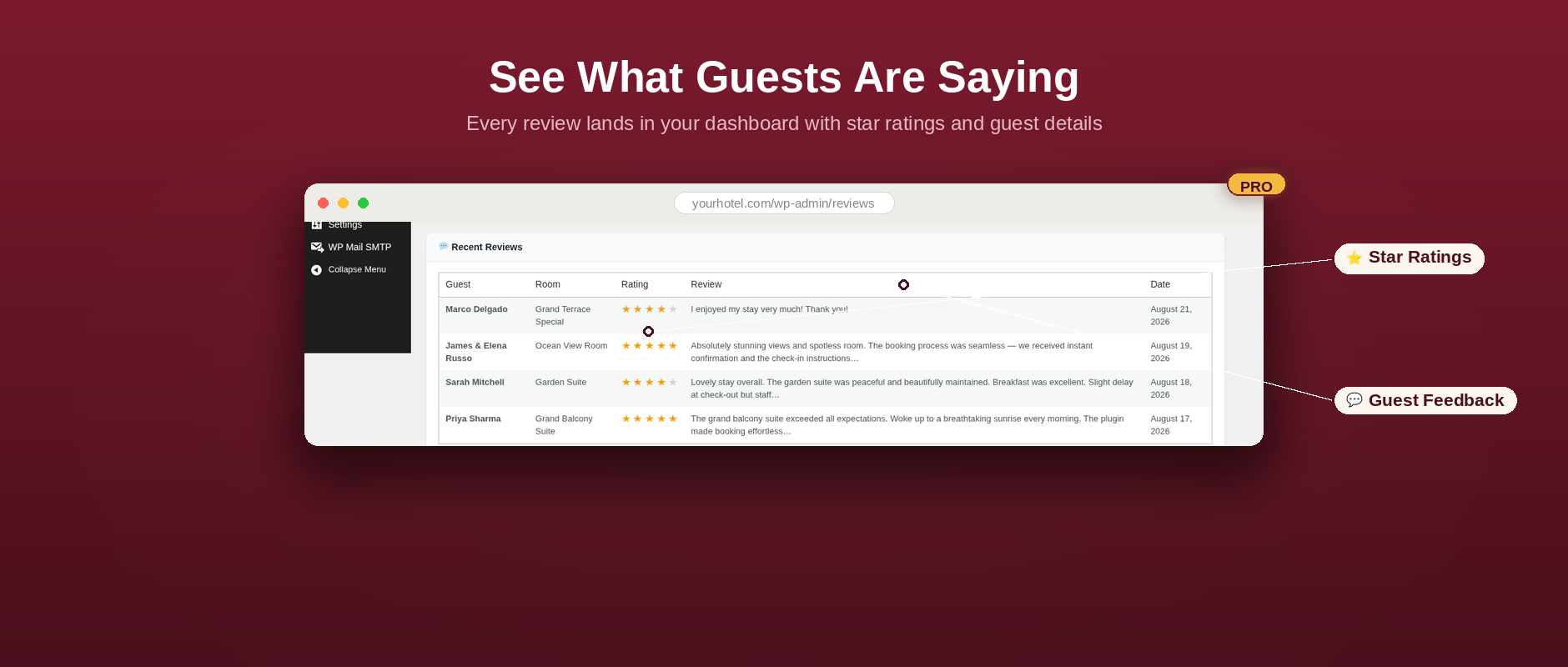
Every review lands in your dashboard with star ratings, guest names, and written feedback. See what your guests loved — and what to improve — at a glance.
 🔍 Click to enlarge
Pricing
No credit card required to get started. The free version is a fully working booking system — Pro adds power-user tools on top.
| Free Always free on WordPress.org | Pro — Single Property $149 / year · $349 lifetime | Pro — Agency $599 / year · $999 lifetime | |
|---|---|---|---|
| Unlimited rooms | ✓ | ✓ | ✓ |
| Booking widget & date picker | ✓ | ✓ | ✓ |
| WooCommerce cart & checkout | ✓ | ✓ | ✓ |
| Automatic date blocking | ✓ | ✓ | ✓ |
| Take rooms off-market | ✓ | ✓ | ✓ |
| Bookings dashboard | ✓ | ✓ | ✓ |
| Live revenue & occupancy reports | — | ✓ | ✓ |
| Manual date blocking calendar | — | ✓ | ✓ |
| Post-stay review system & tracking | — | ✓ | ✓ |
| Length-of-stay discounts | — | ✓ | ✓ |
| Sites covered | 1 | 1 | Unlimited |
| 30-day money-back guarantee | — | ✓ | ✓ |
| Get Pro — Single Site → | Get Pro — Agency → |
Compatibility
GuestPress is built on WooCommerce and works with the tools and payment methods your property already uses.
FAQ
Upgrading takes about two minutes and requires no manual file editing:
No. The Pro plugin handles this automatically. When you activate it, WordPress deactivates the free version to prevent any conflict. All your existing rooms, bookings, and settings are preserved — the Pro plugin reads the same data.
Yes. The free version is a fully working hotel booking system with no feature time-limits, no nags, and no booking caps. Pro adds advanced tools — revenue reports, a visual availability calendar, the automated review system, and length-of-stay discounts — but the core booking flow is free, forever.
Yes. Both Pro plans come with a 30-day money-back guarantee, no questions asked. If GuestPress isn't right for your property, just email us within 30 days of purchase for a full refund.
GuestPress routes all payments through WooCommerce, so it works with any gateway WooCommerce supports — Stripe, PayPal, Square, cash on delivery, bank transfer, and hundreds of regional options. If WooCommerce supports it, GuestPress works with it.
Yes. The booking widget uses standard WooCommerce product pages and inherits your theme's styles. It's been tested with Astra, GeneratePress, Kadence, OceanWP, Storefront, and Divi. If your theme works with WooCommerce, it works with GuestPress.